

What Is Colocation? A Guide to Data Center Colocation
Table of contents
It would be ideal if IT infrastructure always ran without failures: everything stays online, works fast and securely, and requires little ongoing attention. But for most companies, running their own data center or even a small server room is expensive and complicated. This is where colocation comes in.
It would be ideal if IT infrastructure always ran without failures: everything stays online, works fast and securely, and requires little ongoing attention. But for most companies, running their own data center or even a small server room is expensive and complicated. This is where colocation comes in.
Simply put, colocation means placing your own servers and network equipment in a third-party data center. You still own and fully control your hardware, but you avoid the costs of maintaining the building, cooling systems, uninterruptible power, and complex security. In other words, you rent physical space for your equipment — along with the infrastructure that keeps it running. For businesses that want this model, professional colocation services provide the physical environment, power, cooling, connectivity, and security needed to host owned hardware reliably.
To decide whether colocation makes sense for your business, it helps to understand how it works, what it includes, and where its limits are.
How Does Colocation Work?
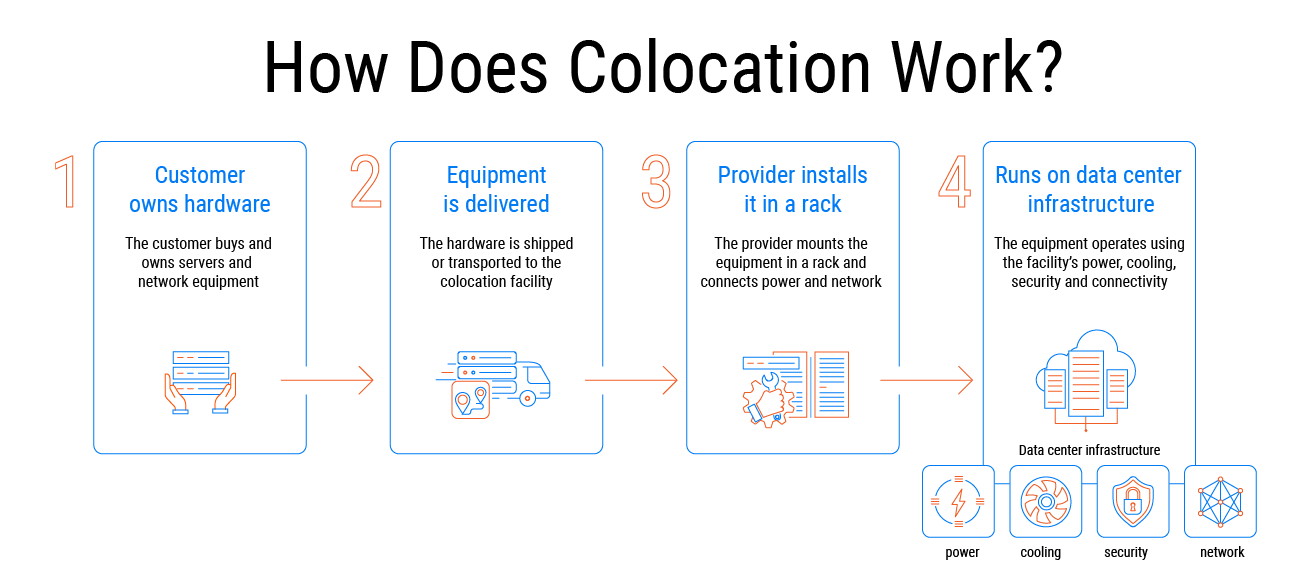
In practice, colocation works as a straightforward transaction between a business and a facility provider. The customer decides which data center location fits their needs — often based on proximity to partners, latency requirements, or regional regulations. Once the site is selected, the provider allocates a specific amount of physical space. That space can be as small as one rack unit (1U), just enough for a single server, or as large as a fully enclosed private cage with its own locking mechanism.
The customer then delivers their hardware to the facility. Professional colocation providers typically offer receiving and installation assistance: they unpack the equipment, mount it into the assigned rack, and connect it to the building’s power distribution and network patch panels. From that point on, the customer’s systems run on the provider’s electrical and cooling infrastructure. The provider also maintains physical security and environmental monitoring. What the customer pays each month covers the occupied space, the electricity consumed, the network port, and any optional services such as dedicated cross-connects or remote technical support.
Unlike cloud hosting, where the provider owns everything, colocation keeps ownership of the hardware with the customer. The facility simply provides the shell and the essential utilities.
Core Components of a Colocation Solution
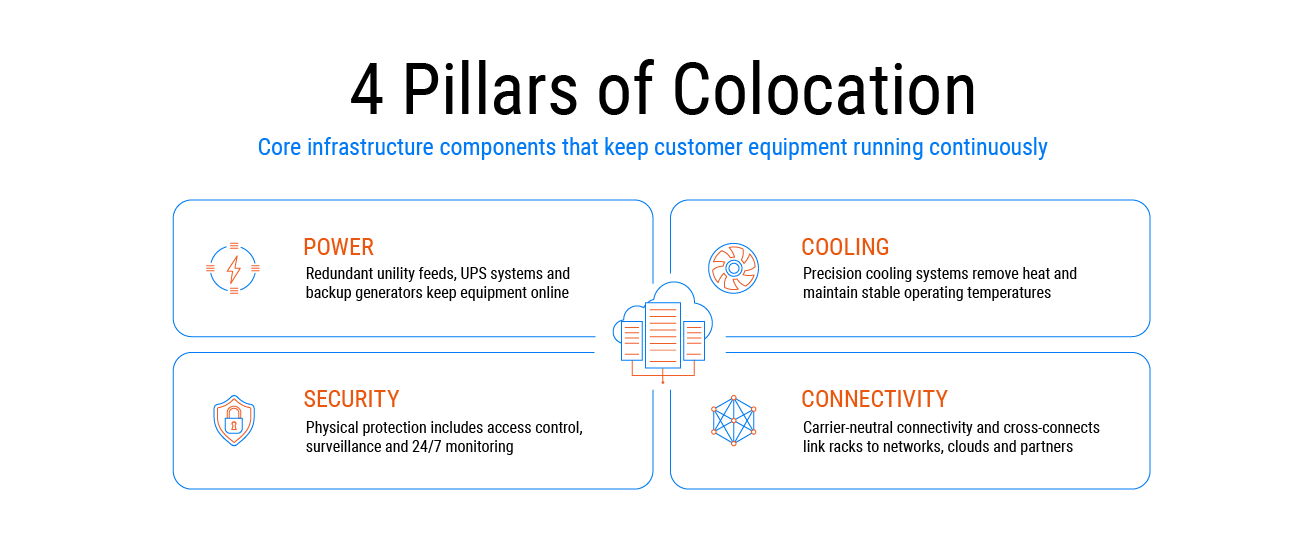
A properly built colocation facility is not just a room with servers. It contains several engineering subsystems that work together to keep customer equipment running continuously. These subsystems are part of a broader Data Center Services ecosystem that supports infrastructure reliability, connectivity, and operational continuity.
Electrical subsystem
The facility draws power from the utility grid but runs it through multiple layers of protection. Double-conversion UPS units smooth out voltage fluctuations and provide ride-through power during short outages. For longer interruptions, diesel generator sets with fuel contracts can run for days. The distribution path is often redundant as well: two separate feeds from the UPS to the rack mean that a single component failure does not shut down the equipment.
Thermal management
Servers convert electricity into heat. In a densely packed colocation hall, that heat must be removed constantly. Traditional data centers use computer room air conditioners (CRACs) with raised floors and cold-aisle containment. Newer high-density deployments, especially those running GPU clusters, require row-based cooling or direct-to-chip liquid cooling. The goal is always the same: keep intake temperatures within the manufacturer’s specified range.
Access control and surveillance
Physical security starts at the perimeter. Fences, mantraps, and 24/7 security staff control who enters the building. Inside, biometric readers (fingerprint or iris) log every movement through security doors. Cameras cover every aisle and entry point. Most facilities also require pre-registered access lists; a visitor cannot simply walk in without an escort.
Connectivity fabric
A colocation data centre is also a networking hub. Multiple carriers bring fibre into the building, often through separate entrance ducts. Inside, customers can order cross-connects — physical copper or fibre cables that link their rack to another tenant, a cloud provider, or an Internet exchange switch. This dense interconnection environment is one of the main reasons companies choose colocation over running their own server room.
Each of these subsystems must be maintained and tested regularly. A well-run colocation provider publishes audit reports and uptime statistics, giving customers visibility into how reliably the infrastructure actually performs.
Benefits of Data Center Colocation
Businesses choose colocation because it solves several real problems. The most obvious benefit is lower capital expenditure. Building your own data center from scratch requires millions in upfront investment, whereas colocation turns those capital expenses into predictable monthly operating expenses. You also get professional infrastructure without the headache — you lease access to systems built to high redundancy standards, such as Tier III or Tier IV data centers, so you no longer need to worry about buying backup generators or upgrading cooling.
Another major advantage is reliability backed by a service-level agreement (SLA). The SLA legally defines the uptime you can expect, often 99.999% or higher, and if the provider fails to meet those numbers, you receive compensation. Lastly, colocation offers scalability: when your business grows, you can add more space or power quickly, sometimes within hours.
Limitations and Things to Consider
Colocation is not a magic solution. It has its own trade-offs. The most important one is that you remain responsible for your own hardware. The provider ensures power, cooling, and physical security, but does not fix your server. If a disk fails or the operating system hangs, you either fix it yourself or pay for remote hands.
There is also the issue of distance. Your servers are not in your office, so for urgent hardware changes you may need to travel to the data center — or again, use remote hands. Finally, choosing the right provider requires careful research. Price is only one factor; reputation, financial stability, support quality, and real-world uptime history matter just as much.
Choosing the Right Solution for Your Business
Finding a trustworthy partner is essential. Start by examining the SLA: know not only the uptime percentage but also the compensation process and support rules. Then check the infrastructure — ask about power and cooling redundancy (N+1, 2N) and when major equipment was last replaced. Look at the provider’s ecosystem: which carriers and cloud providers are already present? A rich ecosystem means easier and cheaper cross-connects.
For example, a carrier-neutral data center can give businesses more flexibility when choosing network providers and building resilient connectivity.
Finally, clarify what is included in the monthly fee. Does it cover remote hands? How fast is the response? What costs extra?
Avoid common mistakes such as ignoring the full cost (cross-connects, extra traffic, power overages, remote hands add up) or forgetting about future growth. Ensure the provider has room to expand and that their infrastructure can handle your future power and cooling needs.
How to Choose a Colocation Provider
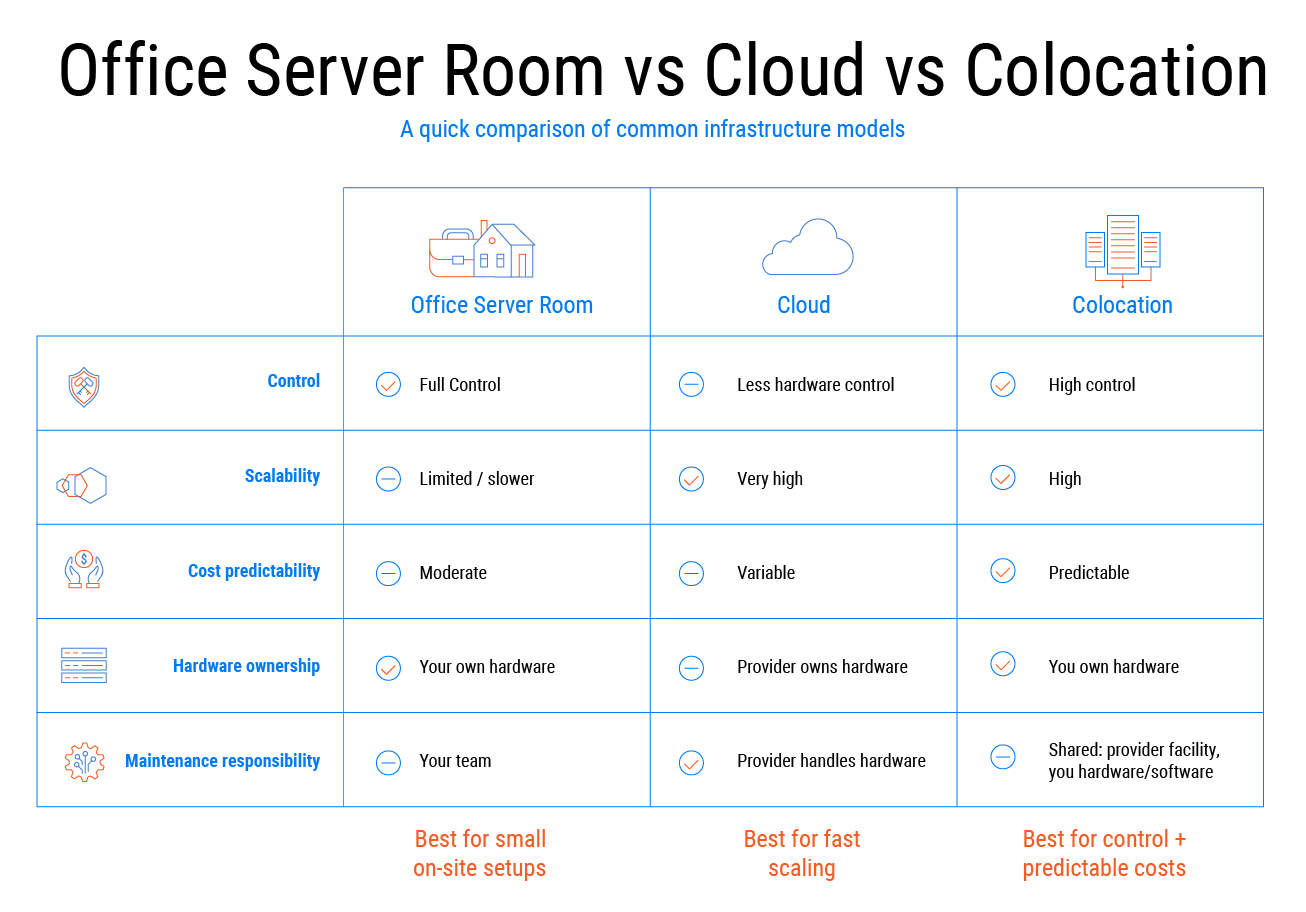
The choice depends on how much hardware control you need, how predictable your budget should be, and how fast you must scale.
Running equipment in your own office gives you full command but puts all responsibility for power, cooling, and security on your own team. Most companies find this practical only when they already have a facilities staff and a small hardware footprint.
Moving entirely to the cloud means renting virtual machines instead of owning hardware. Scaling is instant, and you never fix a broken disk. The trade-off is an unpredictable monthly bill — a traffic spike can cost thousands extra — and limited visibility into where your data actually lives.
Colocation sits in the middle. You buy your own servers and network gear, then place them in a professional data center. The provider handles the building, cooling, redundant power, and perimeter security. You keep control of your software and data. Your monthly fee stays predictable because you pay for fixed space, power, and bandwidth.
A simple rule: steady, always-on workloads fit colocation well. Spiky or experimental loads suit the cloud. If you already own expensive hardware, moving it to colocation often gives the quickest reliability boost without new investment. Many companies eventually mix both: core services in colocation, development and burst traffic in the cloud. For teams comparing infrastructure models, the difference between a cloud or bare-metal server is often a useful starting point.
What People Often Ask About Colocation
–
+
+
+
+
+
+
+